After the game design, it is always a question in mind how to publicize and add the game designed by me as a web page
The answer is here:
- Open “My stuff” in scratch where you have your designed games.
- “My stuff” will display a list of game projects done by you.
- Click and open your project which you wish to convert to an HTML page
- Then copy the URL of the project which contains a scratch project id. See image below

- Copy this URL “https://scratch.mit.edu/projects/385008739/”, “385008739” is your project id in the URL,
- There are several website/ open source codes to convert a scratch game to HTML page. A list of a few is as follows:
- All the above-mentioned URL work in almost the same way here explained through the last “TurboWrap” link
TurboWrap
- The TurboWrap page will look like this
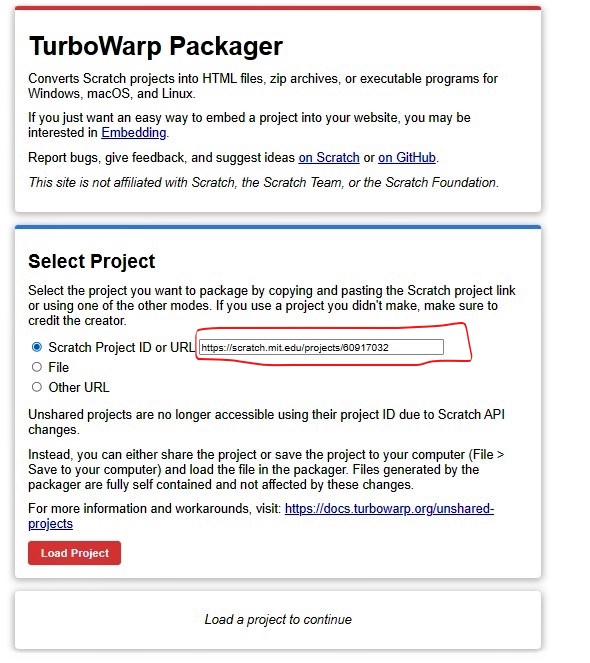
- In Select Project, enter the project URL or scratch project id which you would like to convert to an HTML page.
- Click the “Load Project” button
- In the environment, click HTML as shown in Figure 3.
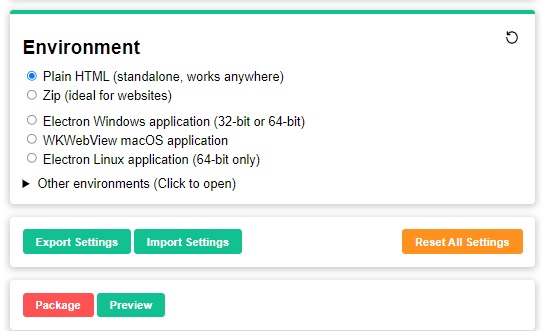
- Click on the preview button, if would like to see how the HTML page will look in play mode
- after verifying, click on the package button to download the scratch project as HTML page.
 ░▒▓█►─═ нIŕᗩ𝔩 𝐚𝓡ᗝⓡค ═─◄█▓▒░
You must be logged in to post a comment.