Okiii let’s start making our first animation. Here there is a cat walking and going to different destinations. It also makes a really fun sound.
STEPS –
- Open scratch and click on create.
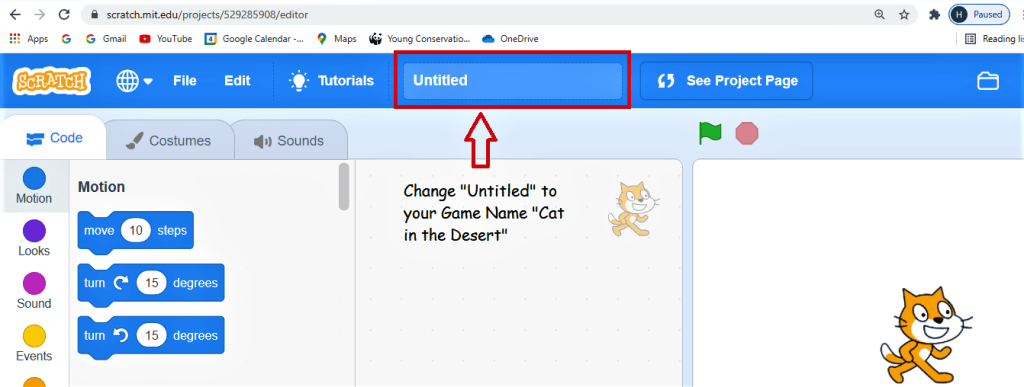
- Change the name from where it says untitled to “Cat Travels the World”
3. Add the mall and the beach backdrop.
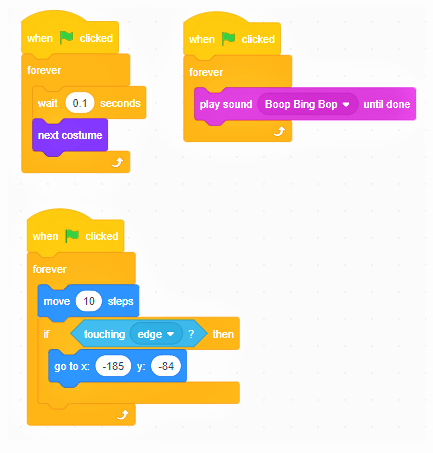
4. Go to the events tab and drag “when the green flag is clicked” to the code window. Go to the control tab and connect Forever loop to the previous code.
5. Go to the control tab and put “wait 0.1 sec” inside the forever loop. Go to the looks tab and connect “next costume” under it.
6. Go to the events tab and drag “when the green flag is clicked” to the code window. Go to the control tab and connect Forever loop to the previous code. Go to the sound tab and put “play sound boop bing pop” inside the forever loop.
7. Go to the events tab and drag “when the green flag is clicked” to the code window. Go to the control tab and connect Forever loop to the previous code. Go to the motion tab and put “move 10 steps” inside the forever loop.
8. Go to the control tab and insert if then statement below the move code inside the forever loop. Go to the sensing tab and put “touching edge” between if and then.
9. Go to the motion tab and connect “go to x= and y=” to it. Click on the backdrop under where it says stage.
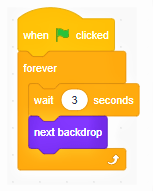
10. Go to the events tab and drag “when the green flag is clicked” to the code window. Go to the control tab and connect Forever loop to the previous code.
11. Go to the control tab and put “wait 3 sec” inside the forever loop. Go to the looks tab and connect “next backdrop” to it.
11. That’s it your first animation is complete.
 ░▒▓█►─═ нIŕᗩ𝔩 𝐚𝓡ᗝⓡค ═─◄█▓▒░
You must be logged in to post a comment.