This is a very simple game in which you have to use arrow keys to make the zombie reach the girl and she screams and runs away. Aahhhh…
STEPS –
- Open scratch and click on create.
- Change the name from where it says untitled to Zombie Farm.

3. Choose a Backdrop by clicking on backdrop icon.
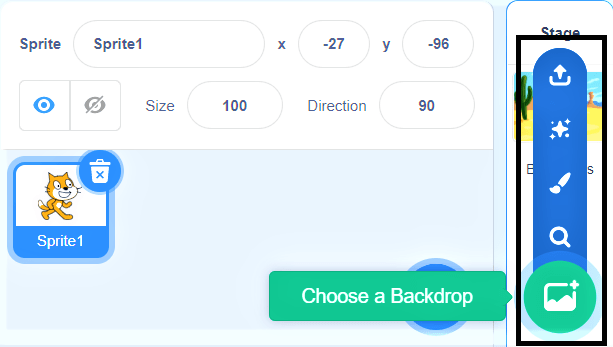
4. Here you can select from a wide range of backdrops.
5. Select farm backdrop.
6. Right Click on the cat sprite and choose delete.
7. Click on choose a sprite from library.

8. Insert a girl and the zombie sprite.
9. Shrink them by clicking on the shrink button.
10. Move the sprites to the desired places.
11. Click on the Zombie sprite.
12. Go to events tab and select “When the green flag is clicked” and drag it to the code window.
13. Go to motion tab and select “Go to x= y=” and join it with previous code.
14. Go to event tab and drag 4 “When space key is pressed” to the code window.
15. Select up, down, right and left in each of them by clicking on the small arrow button.
16. Go to the motion tab and select change x by 10 and drag two of them and attack them with the right and left arrow commands. In the left arrow key change it to (-10).
17. Go to the motion tab and select change y by 10 and drag two of them and attack them with the up and down arrow commands. In the down arrow key change it to (-10).

18. Click on the girl. Go to the events tab and select when the green flag is clicked.
19. Go to motion tab and select “Go to x= y=” and join it with previous code.
20. Go to the control tab and select “if and then command” and drag it to the coding area.
21. Go to sensing tab and select “touching” and write zombie in it and put it between if and then.
22. Go to the looks tab and select “say hello!” and change it to “say AAHH!!”.
23. Go to the sound tab and select pay sound and add a female screaming sound from the down arrow.
24. Go to the motion tab and select “glide 1 sec to x= and y=”.
25. Go to the control tab and select the forever command and put it around the if then statement.
26. Now we join it to the go to statement.

27. Save the file now.
28. Our first game is ready…
 ░▒▓█►─═ нIŕᗩ𝔩 𝐚𝓡ᗝⓡค ═─◄█▓▒░
You must be logged in to post a comment.