In this story a wizard girl is walking on a path to the castle and a monkey is hiding in the forest. The wizard casts Hocus Pocus and the monkey appears in front of the wizard. There is also a magic spell sound.
- Open scratch and click on create.
- Change the name from where it says untitled to Wizard Boy story.

3. Choose a Backdrop by clicking on backdrop icon.

4. Here you can select from a wide range of backdrops.
5. Select castle backdrop with a path in it.
6. Right Click on the cat sprite and choose delete.

7. Click on choose a sprite from library.

8. Insert the Wizard Boy and the monkey sprite.
9. Shrink them by clicking on the shrink button.
10. We can Change the wizards colour by going to costume tab.

11. Move the sprites to the desired places.
12. Click on Wizard Girl.
13. Go to events tab and select “When the green flag is clicked” and drag it to the code window.
14. Go to motion tab and select “Go to x= y=” and join it with previous code.
15. Move the Boy to the middle of the path.
16. Select “Glide 2 sec x= y= “ and join it too.
17. The values of x and y will be with respect to its new coordinates in the middle of the path.
18. You can view these coordinates here.

19. As Hocus Pocus is the signal for monkey to appear. So, we go to events and connect “broadcast message”.
20. Change Hello to “Hocus Pocus”.

21. Go to looks tab and select “Say Hello for 2 secs” and connect it too.
22. Go to sound tab and choose “play a sound” and connect it.

23. Go back to Code and Click arrow and select Magic Spell.

24. Click on the monkey sprite.
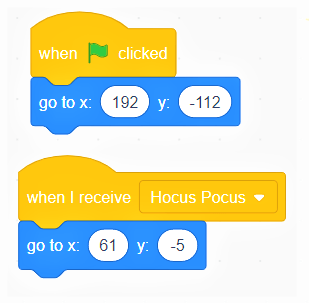
25. Go to the event tab and select “when the green flag clicked” and place in code area.
26. Go to motion tab and select “go to x= and y= “ and connect it.
27. Go to event tab and select “when I receive Hocus Pocus” and connect it.
28. Go to motion tab and select “go to x= and y= “ and connect it.
29. Go to file and save.
30. Our story is complete…
 ░▒▓█►─═ нIŕᗩ𝔩 𝐚𝓡ᗝⓡค ═─◄█▓▒░
You must be logged in to post a comment.